


Cat Music Beat Box
3.410.00 Reviews
App Specs
- Version
- 1.0.8
- Updated On
- License
- Free
- Downloads
- 100,000+
- Developer
- WingsMob
- Categories
- Music
- Platform
- Android
Screenshots


 Analysis by AppCompare
I’m drawn to small music games that let me make something without turning a spare moment into a lesson, and Cat Music Beat Box has a clear hook: it puts cat sounds at the center of playful beat-making. I see it as a light creative toy rather than a full music studio. That distinction matters. You can enjoy experimenting with sound even if you have never tried making a beat, but anyone looking for detailed production tools should keep their expectations modest.
The appeal of building a beat from cat sounds
The central idea is simple: bring together different cat noises and rhythmic music to make a little composition of your own. In a music game, that gives each tap an immediate, amusing payoff. A meow or purr is recognizable on its own, while combining sounds invites you to listen for how they sit together. I like that the fun does not depend on knowing musical terms; curiosity is enough to get started.
WingsMob made this for people who want a playful interaction with sound, not a serious alternative to a desktop recording setup. It is free to download, has a Teen content rating, and runs on Android 7.1 or later. The game was released on December 13, 2024, and version 1.0.8 is the current version. Its average rating is 3.4 from around 325 ratings, with 100K+ installs. Those figures suggest it has found an audience, though they are not a reason by themselves to expect a polished professional tool.
How the sound-making works in practice
The published description of the game is brief, so I would approach it as a compact experiment: listen to individual sounds, try combinations, and pay attention to which ones feel like a beat rather than a jumble. That listening-first approach is more useful than tapping everything at once. Start with just a couple of sounds, notice their contrast, then add another only if it makes the result more enjoyable. Keeping the mix sparse at first makes it easier to hear what each cat sound contributes.
The original appeal of the game is the mix of cat sounds and beat music, but the experience should not be mistaken for open-ended audio production. If you want precise control over arrangements, editing, or a finished track you can use in a larger project, a dedicated music-making app is a better fit. Here, the point is the playful act of combining sounds. I would judge success by whether a short session makes me smile or sparks an idea, not by whether it could pass as a studio recording.
A good fit for quick, low-pressure play
I can picture using it during a short break at home: open the game, try a few sound combinations, and stop once one of them feels amusing. It also makes sense as a casual activity to share with a friend who likes cats, with each person suggesting a sound to add or taking turns making a different little pattern. That kind of back-and-forth gives the game a social use without requiring anyone to be a musician.
It may also suit someone who enjoys playful sound design but finds conventional music software intimidating. A complex music app often asks you to think about tracks, editing, and production choices before you have made anything enjoyable. A cat-themed music game lowers that barrier by making the sounds themselves the attraction. If you are choosing it for a child or teenager, remember the Teen rating and make your own judgment about whether that age guidance fits the person using it.
Worth Reading Before You Choose

EA SPORTS FC Mobile 26 Is a Bigger Football Game, but It Takes Time

Flipboard Shows What News Apps Must Do Beyond the Feed

Switching to Android Auto Means Rethinking Your Driving Routine

Google Calendar Makes a Crowded Week Easier to Manage

Ludo King Makes the Most of the Minutes Between Plans

Baby Panda World Brings Quick Play to Modern Phones, but Its Game Library Feels Busy
Where it sits beside other music games
Compared with rhythm games that ask you to hit prompts in time, this concept is more about arranging sounds than testing reflexes. Compared with loop-based beat makers, its personality comes from the cat theme, while a general-purpose music app is likely the stronger choice for anyone who wants a broader toolkit. That makes the decision fairly straightforward: choose this when the novelty and light experimentation sound appealing; choose a conventional beat-making app when control and versatility matter more.
A useful way to get more from a short session is to treat it like a tiny listening exercise. Try making one version that feels busy, then another with fewer sounds. The contrast can reveal whether the charm comes from the cat noises themselves or from how they interact with the beat. This is not a claim about a hidden mode or a special control; it is simply a way to use the core idea more deliberately and avoid turning every session into random tapping.
The trade-offs to keep in mind
The same focused concept that makes the game approachable also limits its audience. Cat sounds are the whole attraction, so the novelty may wear thin if you want a wide range of instruments or a more serious creative challenge. And while the original article describes options such as tempo and volume adjustments, those controls do not automatically make the game suitable for detailed composition. I would not choose it expecting the workflow of a full digital audio workstation.
There is also a difference between enjoying a sound toy and wanting to keep or publish the result. Recording is described as a way to save a session or share it, which can be handy if you make something funny. But if your main goal is to export polished music, collaborate on a track, or build a finished song, check that the app’s actual workflow meets your needs before investing time in it. For casual play, the recording idea is a bonus; for serious output, it should not be the deciding factor.
Because the game has an average rating of 3.4, I would go in with measured expectations rather than assume every part will suit every player. A rating is only a broad snapshot, but it reinforces the sensible approach: try it for the cat-and-beat concept, and decide based on whether that specific kind of play works for you. Its free price makes that low-commitment trial easier, while the Teen rating is worth considering when choosing an app for someone younger.
Who is likely to enjoy it most
Cat Music Beat Box is most appealing to casual players who like cats, enjoy tapping out playful sound combinations, or want a small creative distraction without a steep learning curve. It can also be a fun conversation starter when friends trade ideas for a silly rhythm. If you are expecting a structured rhythm challenge, a library of many musical styles, or detailed tools for producing songs, you are better off with another kind of music app.
My recommendation is to treat it as a short-form music game, not as a replacement for a music studio or a conventional rhythm title. Its strongest reason to exist is the unusual, cheerful premise: making beat-like combinations from cat sounds. If that sounds entertaining, it is worth trying; if you want depth, precision, or a serious path into music production, the theme alone probably will not make up for the narrower focus.
What is Cat Music Beat Box?
To put it simply, Cat Music Beat Box is an app that lets you create music with the help of some adorable cat sounds. Yes, you read that right! It’s a playful music-making app where you can mix and match different cat sounds to create your own unique beats. Whether you’re a seasoned DJ or just someone who loves a good kitty meow, this app is designed to entertain.
Getting Started
Once you download the app, the setup is a breeze. The interface is user-friendly, making it easy for anyone to dive right in. You don’t need any musical expertise to start creating. There’s a simple tutorial that guides you through the basics, which is super helpful if you’re new to this kind of app.
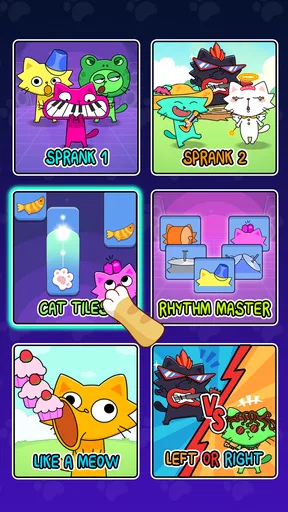
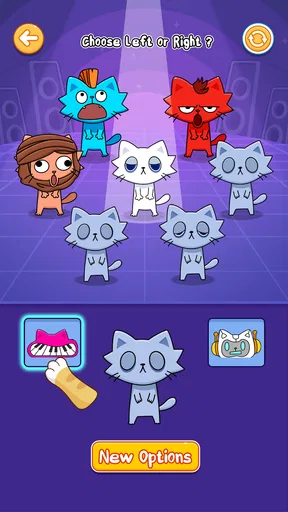
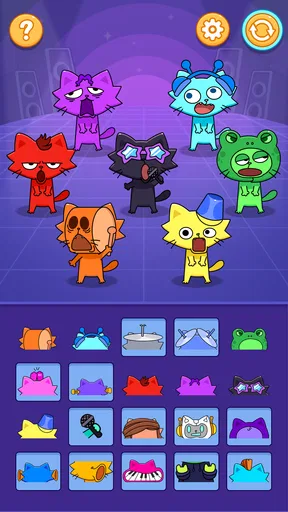
The main screen presents you with a variety of cat sounds, from meows to purrs, all neatly categorized. You can tap on each sound to hear it, and they’re all just so cute! You can create layers of sounds by tapping multiple icons, which lets you build more complex tracks.
Features That Stand Out
One of the things I love about this app is the variety of sounds. It’s not just your standard meow; there are different pitches and tones, which adds a lot of depth to your creations. Plus, you can adjust the tempo and volume to get everything just right.
Another nifty feature is the recording option. You can record your sessions and save them to listen later or share with friends. It’s like having your own mini studio right in your pocket! This feature is perfect for those who want to show off their cat-themed musical talents.
Why You’ll Love It
If you’re looking for an app that combines fun and creativity, this game hits the nail on the head. It’s not just an app for kids; adults can have a blast with it too. The app is great for stress relief, as there’s something inherently relaxing about playing with soothing cat sounds.
It offers a light diversion when you’re on a quick break, commuting, or just lounging. I’d use it in a setting where I can listen and experiment casually, rather than expecting a deep session of music production. If the sounds are likely to distract people nearby, headphones are the considerate choice; if you want to focus on a detailed arrangement, a more capable music app will serve you better.
Some Final Thoughts
In the world of apps, this game stands out for its creativity and fun factor. It’s a well-designed app that doesn’t take itself too seriously, which is exactly why it’s so charming. If you love music and have a soft spot for cats, it is an easygoing option to try, provided you are happy with a playful concept rather than a full production toolkit.
So, go ahead and give it a whirl. Who knows, you might just compose the next big feline hit!
Pros
- Engaging rhythm-based gameplay.
- Colorful and vibrant graphics.
- Easy to learn
- hard to master.
- Frequent updates with new tracks.
- Interactive sound effects enhance play.
Cons
- In-app purchases can be pricey.
- Requires a stable internet connection.
- Limited free content available.
- Advertisements can be intrusive.
- Occasional lag on older devices.
FAQs for Cat Music Beat Box
What is Cat Music Beat Box and how does it work?
Cat Music Beat Box is a fun and interactive music app that lets users create unique beats using a variety of cat sounds. Users can mix and match different cat noises to compose entertaining tracks. The app provides an intuitive interface with easy-to-use controls, making it accessible for all ages. Whether you’re a music enthusiast or just looking for some feline fun, this app offers endless possibilities for creativity.
Is Cat Music Beat Box free to use, or are there in-app purchases?
Cat Music Beat Box is available for free download, providing access to a basic set of features and sounds. However, the app also offers in-app purchases for additional sound packs and advanced features. These optional purchases enhance the user experience by allowing more customization and creativity in beat-making, catering to both casual users and those looking to explore deeper musical creation.
What devices are compatible with Cat Music Beat Box?
Cat Music Beat Box is compatible with most Android and iOS devices. The app is optimized for both smartphones and tablets, ensuring a seamless experience regardless of the screen size. Before downloading, make sure your device meets the minimum operating system requirements specified in the app store to ensure optimal performance and functionality.
Can I share my creations from Cat Music Beat Box with friends?
Yes, Cat Music Beat Box allows users to easily share their musical creations with friends. The app includes options to export your beats and share them via social media platforms or messaging apps. This feature encourages collaboration and sharing, making it a great way to showcase your creativity and engage with others who enjoy music and cats.
Are there any privacy concerns with using Cat Music Beat Box?
Cat Music Beat Box prioritizes user privacy and follows standard data protection practices. The app may require access to certain device features like the microphone for recording purposes. However, it does not collect personal data without user consent. It's always a good idea to review the app's privacy policy and permissions before installation to ensure you are comfortable with how your information is handled.


